Recently, after adding a CDN to the website, there have been a lot of junk requests in the early morning, some are scans, some have large model UserAgents, and some are black spiders.

To save on CDN costs and prevent various injection attacks, I started researching open-source WAF solutions (which is sufficient for my small site). For enterprise use, it is still recommended to use commercial versions, such as Alibaba Cloud’s DCDN, Tencent’s EdgeOne, or overseas options like Cloudflare (preferred for overseas business).

1. Function Introduction

Leichi (SafeLine) is an open-source WAF solution from Chaitin Technology, driven by intelligent semantic analysis algorithms.

The main function is a network security gateway, focusing on WAF, which can defend against all web attacks, such as SQL injection, code injection, OS command injection, CRLF injection, LDAP injection, XPath injection, RCE, XSS, XXE, SSRF, path traversal, backdoors, brute force attacks, HTTP floods, robot abuse, etc.

I briefly reviewed the project source code; the API uses Golang, and the core WAF functionality uses Tengine + Lua, similar to OpenResty.

Project address: https://github.com/chaitin/safeline

Official website: https://waf-ce.chaitin.cn/

https://waf.chaitin.com/

Note: Other popular gateways include Apisix, Kong, Openresty, etc.

2. Installation

Download Offline Image

Since many domestic Docker Hub mirror accelerators have become unavailable recently, we can only use offline methods here.

 1
 2
 3
 4
 5
 6
 7
 8
 9
10
11
12
13
14
15
16
17
18
19
20
21
22
23
24
# mkdir /opt/safeline
# cd /opt/safeline
# wget https://demo.waf-ce.chaitin.cn/image.tar.gz
# cat image.tar.gz | gzip -d | docker load
# docker ps 
REPOSITORY                                                           TAG       IMAGE ID       CREATED         SIZE
chaitin/safeline-fvm                                                 latest    d9589d01be57   3 days ago      175MB
swr.cn-east-3.myhuaweicloud.com/chaitin-safeline/safeline-fvm        latest    d9589d01be57   3 days ago      175MB
chaitin/safeline-mgt                                                 latest    56ef6365e4c3   3 days ago      81.6MB
swr.cn-east-3.myhuaweicloud.com/chaitin-safeline/safeline-mgt        latest    56ef6365e4c3   3 days ago      81.6MB
chaitin/safeline-luigi                                               latest    1423e012eef0   3 days ago      31.8MB
swr.cn-east-3.myhuaweicloud.com/chaitin-safeline/safeline-luigi      latest    1423e012eef0   3 days ago      31.8MB
chaitin/safeline-mario                                               latest    758fd16c3d30   3 days ago      201MB
swr.cn-east-3.myhuaweicloud.com/chaitin-safeline/safeline-mario      latest    758fd16c3d30   3 days ago      201MB
chaitin/safeline-bridge                                              latest    94aaed2a1b5a   3 days ago      17.9MB
swr.cn-east-3.myhuaweicloud.com/chaitin-safeline/safeline-bridge     latest    94aaed2a1b5a   3 days ago      17.9MB
chaitin/safeline-tengine                                             latest    c67893333287   3 days ago      140MB
swr.cn-east-3.myhuaweicloud.com/chaitin-safeline/safeline-tengine    latest    c67893333287   3 days ago      140MB
chaitin/safeline-detector                                            latest    f5cff5cc7e35   3 days ago      179MB
swr.cn-east-3.myhuaweicloud.com/chaitin-safeline/safeline-detector   latest    f5cff5cc7e35   3 days ago      179MB
chaitin/safeline-chaos                                               latest    71b05b47e3fd   3 days ago      118MB
swr.cn-east-3.myhuaweicloud.com/chaitin-safeline/safeline-chaos      latest    71b05b47e3fd   3 days ago      118MB
chaitin/safeline-postgres                                            15.2      bf700010ce28   13 months ago   379MB
swr.cn-east-3.myhuaweicloud.com/chaitin-safeline/safeline-postgres   15.2      bf700010ce28   13 months ago   379MB

Configure Environment

1
2
3
4
5
6
7
8
# cd  /opt/safeline
# vim .env
SAFELINE_DIR=/opt/safeline
IMAGE_TAG=latest
MGT_PORT=9443
POSTGRES_PASSWORD=Pgssf201Waf
SUBNET_PREFIX=172.22.222
IMAGE_PREFIX=chaitin
  • SAFELINE_DIR: Leichi installation directory, configured as /opt/safeline here.
  • IMAGE_TAG: The version of Leichi to install, keep the default latest.
  • MGT_PORT: The port for the Leichi console, keep the default 9443.
  • POSTGRES_PASSWORD: The initial password for the database required by Leichi, please generate one randomly.
  • SUBNET_PREFIX: The subnet prefix for the internal network of Leichi, keep the default 172.22.222.
  • IMAGE_PREFIX: The prefix for the Leichi image source, keep the default chaitin.

Manage Containers with docker-compose:

 1
 2
 3
 4
 5
 6
 7
 8
 9
10
11
12
13
14
15
# cd "/opt/safeline"
# wget "https://waf-ce.chaitin.cn/release/latest/compose.yaml"  -O docker-compose.yaml
# docker-compose  up -d
# docker-compose ps 
Name                     Command                  State                            Ports
--------------------------------------------------------------------------------------------------------------------
safeline-bridge     /app/bridge serve -n unix  ...   Up
safeline-chaos      ./entrypoint.sh                  Up             9000/tcp
safeline-detector   /detector/entrypoint.sh          Up (healthy)   8000/tcp, 8001/tcp
safeline-fvm        ./fvm /app/config.yml            Up
safeline-luigi      /bin/sh -c /app/luigi            Up             80/tcp
safeline-mario      /mario/entrypoint.sh             Up (healthy)
safeline-mgt        /docker-entrypoint.sh /bin ...   Up (healthy)   0.0.0.0:9443->1443/tcp,:::9443->1443/tcp, 80/tcp
safeline-pg         docker-entrypoint.sh postg ...   Up (healthy)   5432/tcp
safeline-tengine    entrypoint.sh nginx -g dae ...   Up

The first login to Leichi requires initializing the admin account. Execute the following command:

1
docker exec safeline-mgt resetadmin

After executing the command, the admin account password will be randomly reset, and the output will be as follows:

[SafeLine] Initial username:admin
[SafeLine] Initial password:**********
[SafeLine] Done

At this point, the basic installation is complete. You just need to open port 9443 in the cloud ACL.

You can access the Leichi console by opening a browser and visiting https://:9443/.

3. Website Configuration

SSL Certificate Configuration:

Supports both custom uploading of certificates and applying for free certificates.
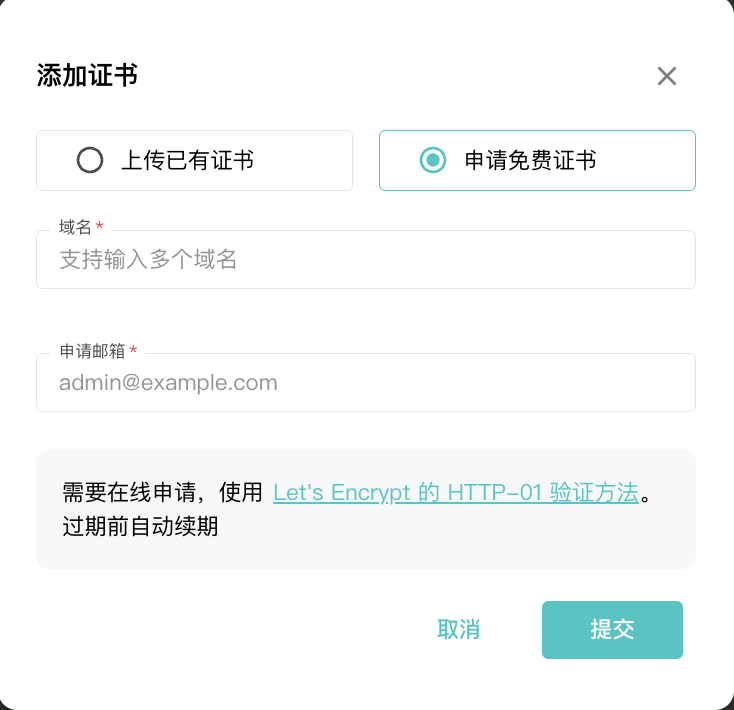
Add Certificate

Add Site:

Add a site. By default, CAPTCHA, identity verification, and dynamic protection are already enabled. Note that when adding upstream servers, the origin configuration is somewhat vague, such as the origin port and protocol.
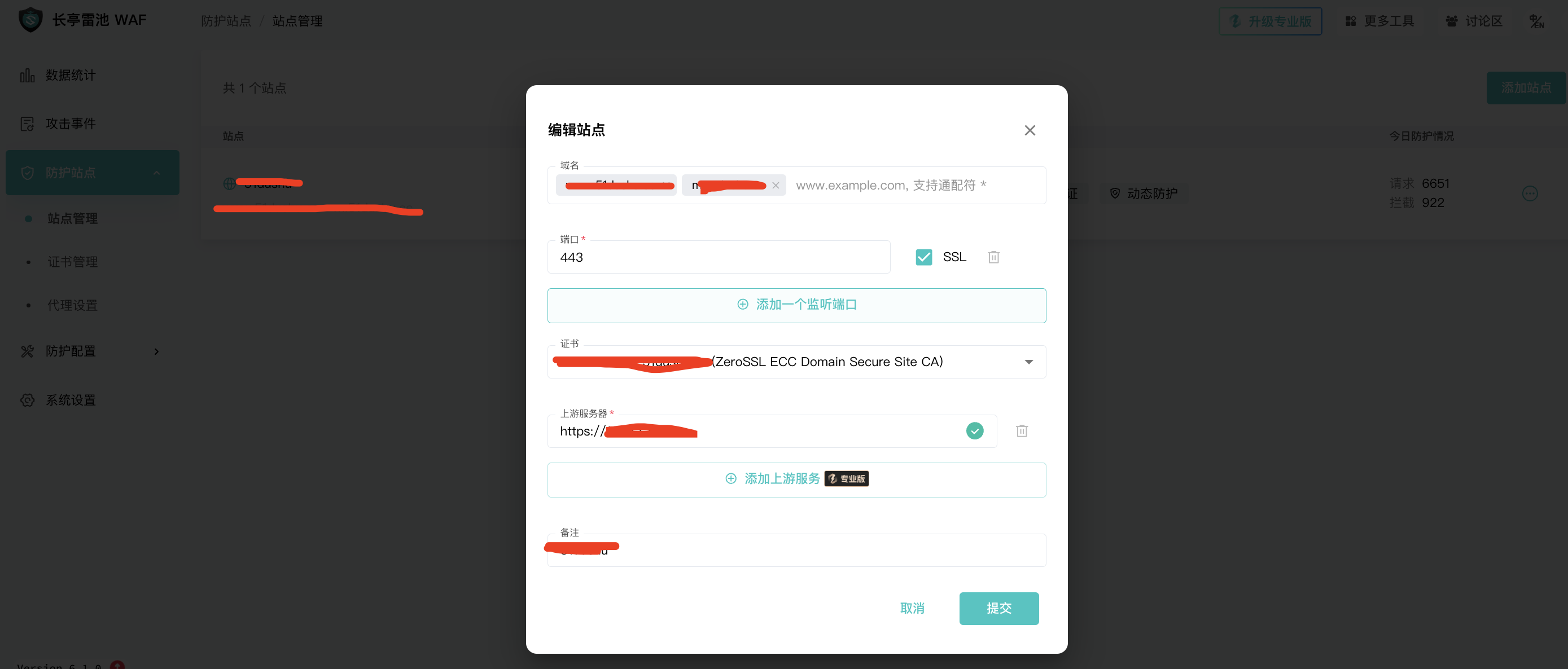
Add Site

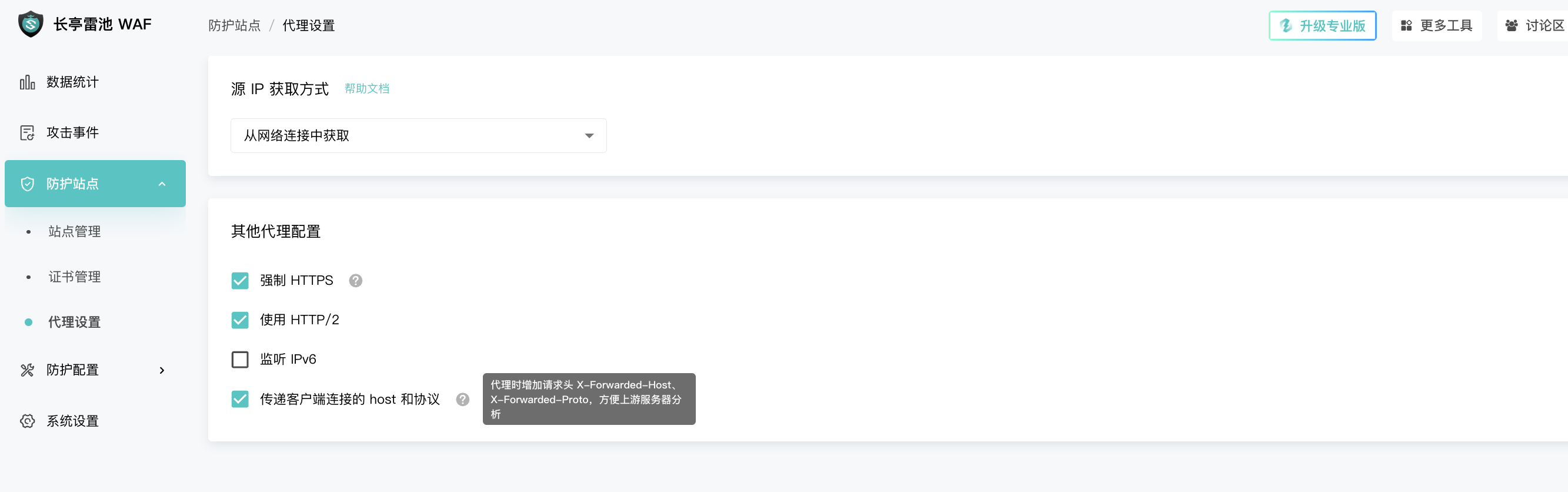
Proxy Configuration:

Proxy Configuration

Security Protection Settings:

Here, you mainly configure rate limits (similar to Nginx limit), custom rules (based on HTTP header information), and semantic analysis (related to injections).

Rate Limiting: The underlying logic is similar to Nginx’s limit_req, limit_conn, and limit_rate.
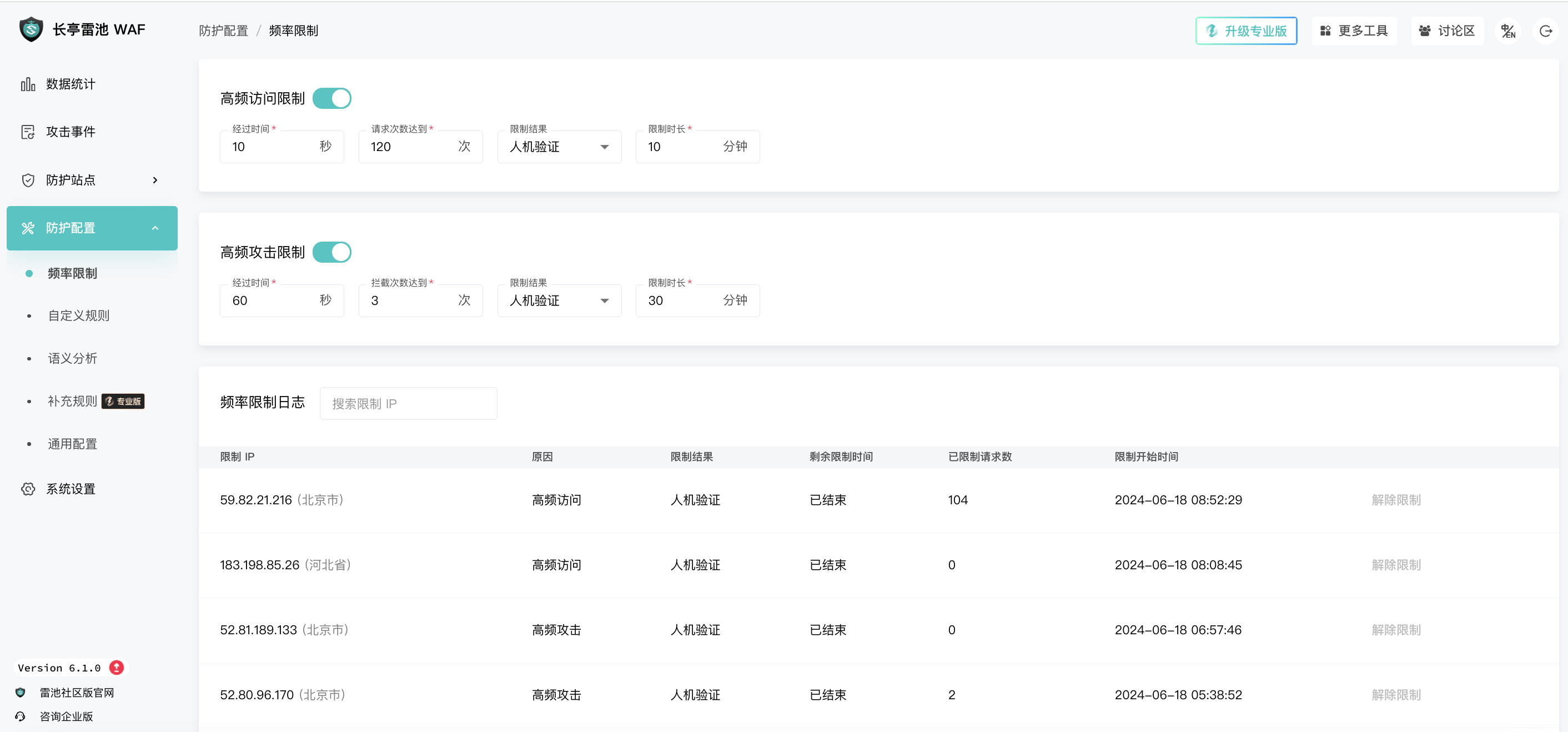
Rate Limiting

Custom Rules: Mainly based on HTTP header information to set policies, similar to common CDN access control, but this feature is more flexible.
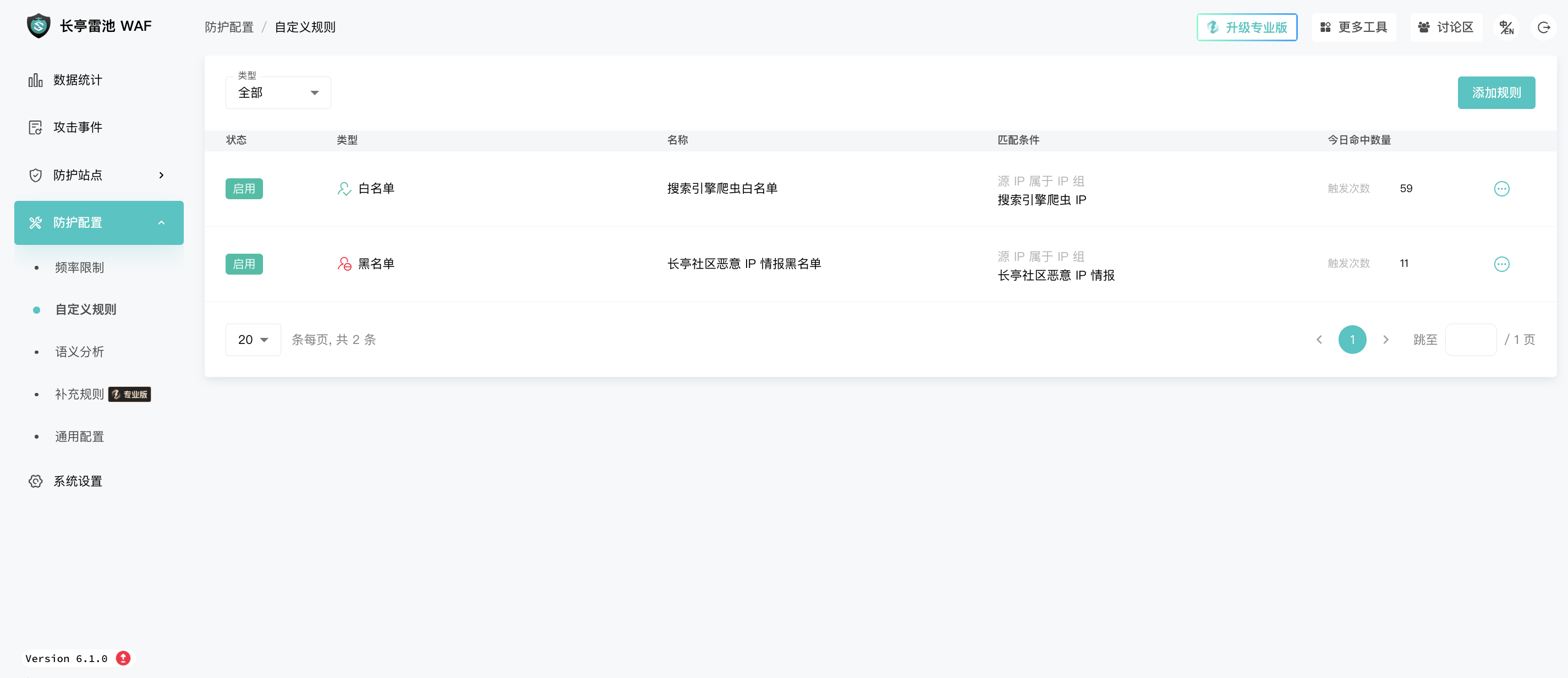
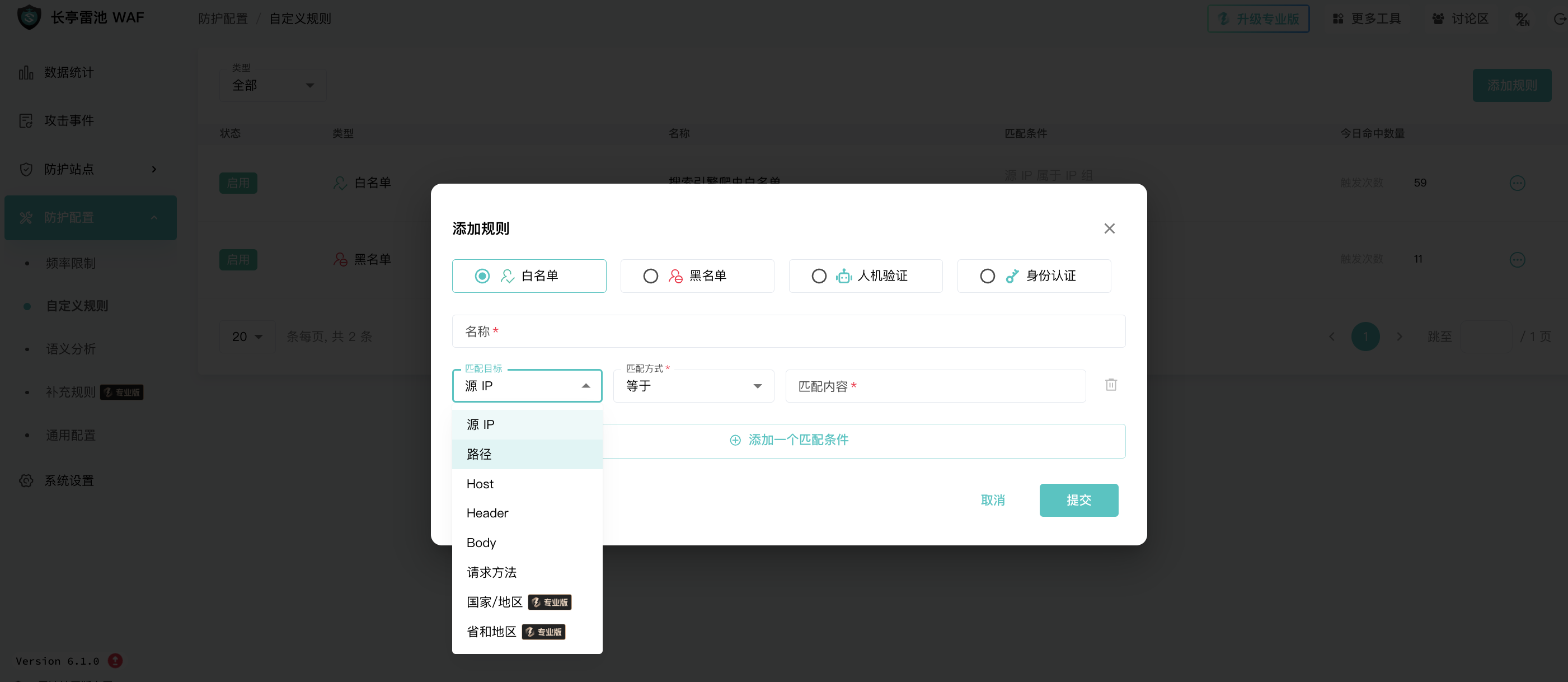
Custom Rule 1

Custom Rule 2

Semantic Analysis: Mainly for identifying various injections and bot detection.
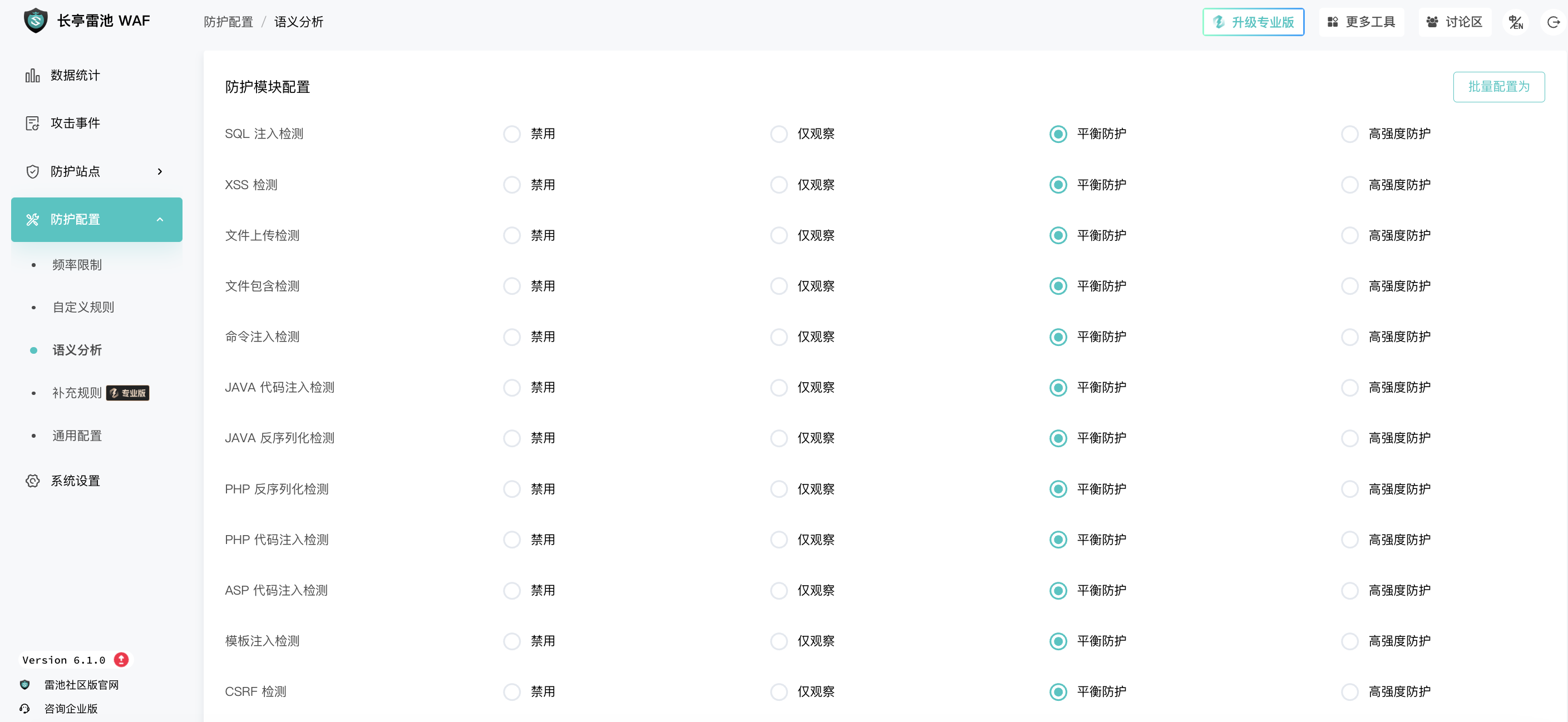
Semantic Analysis

4. Summary

After two days of testing, Leichi basically meets the needs of my small site, but it also has many areas where it falls short.

For example: Free certificate application does not support wildcard domains, and the origin server protocol is vague.

Finally, here is a screenshot of the Leichi backend homepage.
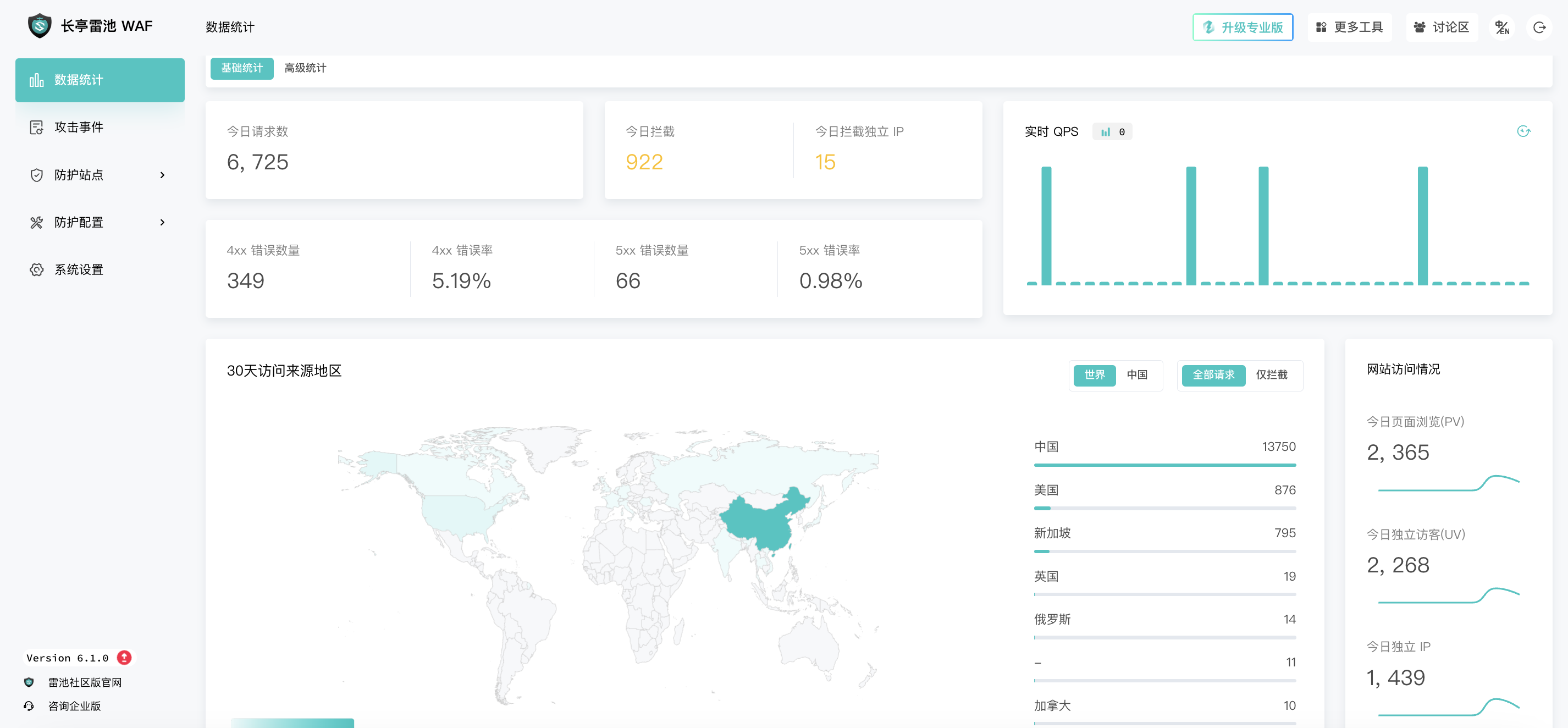
Leichi Backend Homepage

References: https://docs.waf-ce.chaitin.cn/zh/home