Introduction to the Automation Orchestration Tool Terraform
What is Terraform?
Terraform is an open-source infrastructure orchestration tool introduced by HashiCorp around 2014. It is now supported by nearly all major cloud service providers, including Alibaba Cloud, Tencent Cloud, Huawei Cloud, AWS, Azure, Baidu Cloud, and more. Many companies today build their infrastructure using Terraform.
Background: In traditional operations, launching a business required multiple preparatory steps such as hardware procurement, server rack mounting, network setup, and system installation. With the rise of cloud computing, major public cloud providers offer user-friendly graphical interfaces—users can purchase various cloud resources via a browser and quickly set up their architecture. However, as business architectures expand, the scale and variety of cloud resource procurement continue to grow. When users need to rapidly acquire large numbers of diverse cloud resources, the numerous interactive operations across cloud management consoles actually reduce procurement efficiency. For example, initializing a classic VPC network on the Alibaba Cloud console—from creating the VPC and VSwitches to setting up NAT gateways, elastic IPs, and routing configurations—can take 20 minutes or even longer. Moreover, the non-reproducible nature of manual work leads to redundant efforts when operating across regions or multi-cloud environments.
In reality, operations personnel care only about resource configuration—not the step-by-step creation process. Think of it like ordering coffee: you just tell the waiter what kind of coffee and whether to add ice. If there were a complete list of required cloud resources—clearly specifying types, specifications, quantities, and relationships between resources—you could deploy everything with one click. And when business needs change, simply updating the list would allow rapid reconfiguration of cloud resources. This concept in cloud computing is known as infrastructure orchestration. Today, many cloud platforms provide similar capabilities, such as Alibaba Cloud’s ROS, AWS CloudFormation, etc.
Infrastructure as Code (IaC):
Defining cloud resources, services, or operational steps as code within templates, then using an orchestration engine to automate resource management—this is Infrastructure as Code (IaC), the most efficient approach to resource orchestration. However, different cloud orchestration services bring high learning costs, low code reusability, and complex workflows for multi-cloud coordination. Each service typically manages only its own cloud platform, making unified management of multiple clouds and various layers (e.g., IaaS, PaaS) difficult. How can we solve this? Can we use a single orchestration tool with a unified syntax to manage multiple clouds—including Alibaba Cloud—uniformly? That’s exactly why Terraform was created—to address these challenges.
Features and Functions of Terraform
Key Features
- IaC: Manage infrastructure using code.
- Execution Plan: Shows actions that will be performed during
terraform apply. - Resource Graph: Visualizes all resources and their relationships.
- Change Automation: Based on execution plans and resource graphs, clearly identifies what changes are needed and in what order.
Summary: Terraform is used for initializing various infrastructure resources, supports multiple cloud platforms, and enables integration with third-party services.
Benefits
- Uses APIs from different providers and abstracts them into standardized Terraform code.
- Users don’t need to understand the intricate details of each cloud provider’s API, significantly reducing deployment complexity.
Terraform Architecture
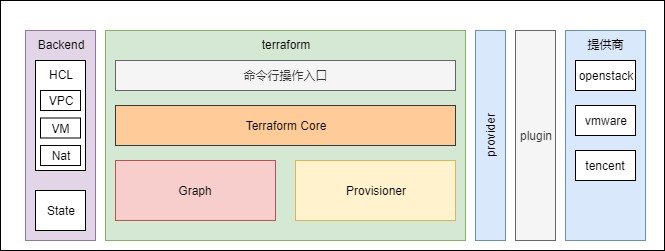
Terraform follows a plugin-based architecture, offering strong extensibility and allowing developers to easily extend its functionality. Logically, Terraform consists of two layers: the Core Layer (Terraform Core) and the Plugin Layer (Terraform Provider).
Core Layer
The core layer is essentially the Terraform command-line tool, written in Go. It handles:
- Reading
.tfconfiguration files and performing variable substitution. - Managing resource state files.
- Analyzing resource dependencies and generating dependency graphs.
- Creating resources based on dependency relationships. Resources without dependencies are created in parallel (default: 10 concurrent processes)—this is why Terraform efficiently manages cloud resources.
- Calling the plugin layer via RPC.
Plugin Layer
Also written in Go, Terraform has over 250 different plugins. These plugins:
- Receive RPC calls from the core layer.
- Execute specific services.
There are two main types of plugins:
Provider
Providers integrate with external APIs—for example, the Alibaba Cloud Provider enables creation, modification, and deletion of Alibaba Cloud resources. This plugin interacts with Alibaba Cloud’s API endpoints and provides an abstraction layer so developers can manage resources via Terraform without needing to know API details. Responsibilities include:
- Initializing communication with external APIs.
- Handling authentication with external services.
- Defining relationships between cloud resources and external services.
Common providers:
Alibaba Cloud: https://github.com/aliyun/terraform-provider-alicloud
Baidu Cloud: https://github.com/baidubce/terraform-provider-baiducloud
Tencent Cloud: https://github.com/tencentcloudstack/terraform-provider-tencentcloud
Huawei Cloud: https://github.com/huaweicloud/terraform-provider-huaweicloud
UCloud: https://github.com/ucloud/terraform-provider-ucloud
QingCloud: https://github.com/yunify/terraform-provider-qingcloud
AWS: https://github.com/hashicorp/terraform-provider-aws
Azure: https://github.com/terraform-providers/terraform-provider-azurerm
Google Cloud: https://github.com/hashicorp/terraform-provider-google
Provisioner
Provisioners execute scripts after resource creation or deletion. For instance, the Puppet Provisioner can download, install, and configure a Puppet agent on a newly created virtual machine.
For better understanding, here’s a simplified component architecture diagram from online sources:
Below is a basic workflow diagram for daily Terraform operations:

Terraform Keywords Explained
Declarative Language (HCL)
Terraform uses HashiCorp Configuration Language (HCL), which is declarative. This means developers describe what the infrastructure should look like, and Terraform takes care of how to achieve it—without requiring knowledge of implementation steps or how Terraform interacts with cloud provider APIs. Terraform automatically downloads the necessary Providers and Provisioners to handle the details.
In contrast, imperative languages execute commands step-by-step, where order matters. Fixed inputs produce fixed outputs. While neither paradigm is inherently superior, declarative approaches are more convenient for cloud resource orchestration. All mainstream cloud orchestration tools—like AWS CloudFormation, Azure Resource Manager Templates, Google Cloud Deployment Manager—are declarative. Using Tencent Cloud APIs directly for orchestration typically results in an imperative workflow.
State File
After initialization, Terraform generates a state file that records:
- Timestamp of the last operation.
- Attributes of each resource.
- Current values of variables.
- Version of the state file.
When running Terraform again, it first synchronizes the local state file with the actual state on the cloud provider to detect any deleted or modified resources. Then, based on the .tf configuration, it determines which resources need to be created, updated, or destroyed. After the operation completes, a new state file is generated.
Backend
The integrity of the state file is critical. We must ensure:
- Automatic locking at the start of an operation and release only upon completion to prevent concurrent modifications.
- Tracking version changes of resources.
- Access control for sensitive information in the state file.
The backend defines how Terraform reads, stores, locks, and manages the state file—and is tightly coupled with how terraform apply executes.
By default, Terraform uses a local backend, storing the state file in the current directory and executing locally. This works fine for individual users managing small-scale infrastructure. But as team size grows, multiple developers may have separate workstations, requiring a shared location for state files. In such cases, remote backends become essential.
Terraform supports several remote backends:
- AWS S3
- HashiCorp Consul
- etcd
- Terraform Cloud
- Terraform Enterprise
These remote backends provide secure remote storage and state locking. Terraform Enterprise also offers remote execution of Terraform and additional enterprise-grade features.
Module
A module is a reusable piece of Terraform code designed for easy sharing. A module consists of:
- Input parameters (variables).
- Output parameters.
- Main logic.
This structure closely resembles functions in traditional programming languages. Terraform maintains a public module registry where modules can be published if they follow the standard format. Once published, others can use them directly.